
That's where Aurora, a new and unique photo editing software from Light Crafts, comes in. It's designed to allow users to edit photos, no matter their photography knowledge.
Aurora allows you to select a photo to edit, then shows a pop-up image selector to allow you to see how you can change your photo. Basically, you are able to see your original photo versus several edited options.
Aurora has a unique relight feature that allows users to "turn on" the light in the photo. With one click, it makes your photo more true to life, to what you saw when taking the photo.
Before:

After, using the relight feature:

Aurora also allows users to crop and straighten photos, adjust strength and warmth, and reduce red eye. My flash always creates red eye, so this was a life saver for me!
Before: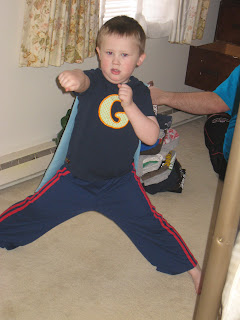
After:

Before:

After:

Before:

After:

Aurora also saves the photo with an "au" at the end of the file name, so you don't need to worry about overwriting or losing your original file. I can't tell you how many times I've done this in the past.
You can also log in to Faceook, Flickr, or other social media sites from within Aurora, allowing you to edit and update your photos easily.
Want to try it for yourself? Aurora can be purchased for $19.95.
Would you like to win?
10 readers will have the opportunity to download Aurora for free
To enter: Check out Aurora and let me know what feature you are most interested in trying out. (With a way to contact you!)
10 readers will have the opportunity to download Aurora for free
To enter: Check out Aurora and let me know what feature you are most interested in trying out. (With a way to contact you!)
Want extra entries?
Follow me on Blogger
Grab my button
Add me to your blog roll
Follow me on Twitter (Please leave your username)
Tweet this giveaway (Please leave link)
Follow me on Blogger
Grab my button
Add me to your blog roll
Follow me on Twitter (Please leave your username)
Tweet this giveaway (Please leave link)
Please leave 1 extra comment for each thing you do!
Contest will end May 7 at 11:59 pm. Winners will be posted and emailed.
Be sure to check out The Ultimate Blog Carnival on Live Giveaways.Com for other giveaways May 4th-8th.
Be sure to check out The Ultimate Blog Carnival on Live Giveaways.Com for other giveaways May 4th-8th.
I like the relight button. I've never seen that feature before
ReplyDeleteI follow on google
ReplyDeleteI'm following you on twitter
ReplyDeleteYou are on my blogroll
ReplyDeleteOMG....I never heard of Aurora!
ReplyDeleteI would definitely like the relight feature!
I'm following you :)
ReplyDeleteI grabbed your button
ReplyDeleteI added you to my blog roll
ReplyDeleteI'm following you on twitter (http://twitter.com/kilo_lima_hotel)
ReplyDeleteHere's my tweet: (http://twitthis.com/mnv4hy)
ReplyDeleteI love the auto relight tool - imagine all that you can do with your photos with that lil gadget - no having to mess with contrasts etc...
ReplyDeleteI follow you on blogger
ReplyDeleteI follow you on Twitter (LiveLaughLoveCj)
ReplyDeleteI like the Visual editing fetures. We have many pictures with redeye or other types of defects and I'd love to be able to edit them.
ReplyDeleteI'm following you on Twitter. My ID is @amylou61
ReplyDeletethe re light button is most unique thanks for the giveaway
ReplyDeleteThe online back up for a modest fee sounds good.
ReplyDeleteThanks for the giveaway!
Kimspam66(at)yahoo(dot)com
I like the relight feature!
ReplyDeletecassandra@aubut.net
I like the online photo backup. We lost a bunch of photos when my husband's hard drive crashed.
ReplyDeletehafner611{AT}gmail{DOT}com
I stink at converting to b&w so I would be interested to try that out. Thanks for a wonderful giveaway!
ReplyDeleteI have you on my blogroll - it is on the bottom of my blog :) Thanks again!
ReplyDeletei'm most interested in the red-eye reduction feature
ReplyDeleteI could really use this! I am constantly wanting to fix and retouch pictures. The relight button would be so handy!
ReplyDeleteThanks!!